Set up rewards
Choose how many stamps a card holds, add milestone rewards on the way, and decide what a full card or a points balance is worth.
A stamp card's rewards live in the card's design: how many stamps fill it, what the full card earns, and any smaller rewards on the way. Staff see the same rewards in the app when they stamp, and customers see them on their pass.
Every planBefore you start#
- A loyalty template. See create a template — the Collecting choice there makes it a Stamps or a Points card.
- Permission to edit templates on your account.
Set the number of stamps#
- Open the stamps
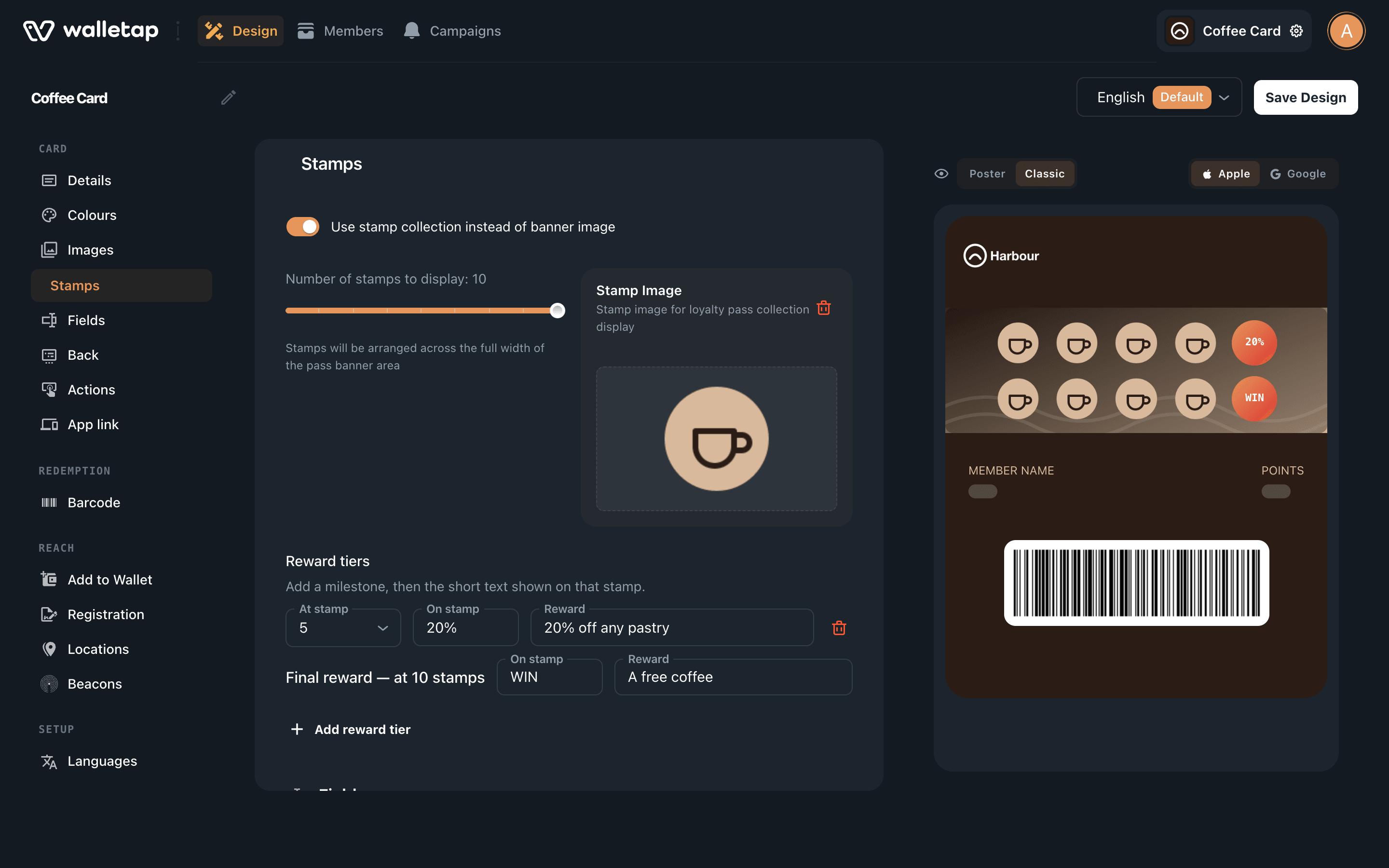
Go to TemplatesCoffee CardDesign and choose Stamps in the left-hand list.
- Check that the card collects stamps
Use stamp collection instead of banner image is on for a stamp card. Switching it on turns a points card into a stamp card: the stamps are drawn across the card's banner image.
- Set the size
Drag Number of stamps to display to the number of stamps that fills the card, from 2 to 10. Coffee Card uses 10.
- Choose the stamp artwork
Every new card starts with a default stamp. To use your own, upload an image under Stamp Image. The preview shows the card with your stamps on it.
- Save
Click Save Design. You see Pass design saved!
The number of stamps applies to every card on the template, including the ones customers already hold. Settle it before you start issuing cards.
Add milestone rewards#
The full card always earns the final reward. Milestones are optional smaller rewards on the way, such as 20% off a pastry at the fifth stamp.
- Describe the final reward
Under Reward tiers, the row Final reward — at 10 stamps is already there. Fill in On stamp, the short text drawn inside the last stamp, and Reward, what the customer gets.
- Add a milestone
Click Add reward tier. Pick the stamp it unlocks at under At stamp, then fill in On stamp and Reward for it.
- Save
Click Save Design.
For Coffee Card, that looks like this:
| At stamp | On stamp | Reward |
|---|---|---|
| 5 | 20% | 20% off any pastry |
| 10 (final) | WIN | A free coffee |
On stamp holds up to three characters, because it is drawn inside a stamp.
Write a label for the reward there, not a number of stamps — 5 on the fifth stamp
reads as a count, not as a prize.
Once you start filling in tiers, give every tier both an On stamp and a Reward. The editor shows a warning while one is missing.
Where rewards show up#
- On the pass. Each milestone stamp carries its On stamp label. The pass details show a Next reward line with the Reward text of the next reward the customer has not claimed yet.
- In the app. When a card has milestones, the stamp sheet lists them under the tiles with a Claim button once they are reached. See hand over a reward.
What happens when a card fills#
- The card stays full. It never rolls over on its own. Stamps added to a full card are not counted, so a customer cannot lose a reward to an extra stamp.
- Staff see the reward. The app shows Reward unlocked! and a Redeem reward button.
- Redeeming starts the next card. The count goes back to zero, and milestones can be claimed again on the new card.
- Analytics records both moments: a reward earned when the card fills, and a reward redeemed when it is emptied. See loyalty analytics.
To send customers a message when they get there, create a campaign on the template with the trigger An event, the event Stamps milestone, and Reaches set to the card size. See automated campaigns.
Rewards on a points card#
A points card holds a balance, and what the points buy is up to you. Two things make it work:
- Tell customers the rates. In DesignBack, click Add field and write them into it, such as "100 points = a free coffee". See fields.
- Spend at the counter. Staff open Points in the app, choose Subtract and enter the cost of the reward.
A campaign with the event Points milestone can tell customers when their balance reaches a reward.
Set rewards in the mobile app#
When you create a card in the mobile app, the template wizard asks the same questions: Loyalty type (Points, Stamps or Both), Number of stamps, and Reward tiers with On stamp and Reward for each. See the mobile app.
Limits#
| Setting | Limit |
|---|---|
| Stamps per card | 2 to 10 |
| Milestones | One per stamp below the final reward |
| On stamp | Up to 3 characters |