Loyalty analytics
Every figure on the mobile app's Analytics tab for a loyalty template — visits, rewards, retention, segments and the members to act on.
For a loyalty template, the mobile app's Analytics tab shows how often members come back, which rewards are waiting to be handed out, and who is drifting away. Every figure is for the template you are working in.
Where to find it#
In the mobile app, work in the loyalty template — the Coffee Card, say — and open Analytics, the first tab in the bottom bar. Choose 7 days, 30 days or 90 days at the top; the app remembers your choice. Pull down to refresh. When several loyalty cards are active in the app, chips at the top switch between them.
| Part of the screen | Plan |
|---|---|
| The tiles at the top | Every plan |
| Everything below the tiles | Paid plans |
Without full analytics, Act on, Activity, Peak times, Retention and Most loyal are shown locked, with Unlock.
Terms used on this screen#
Member — one valid card of this template.
Visit — a day on which a member did something at your business: an accepted scan, a stamp, points earned or spent, or a reward redeemed. A scan and a stamp on the same day are one visit. Setting a points balance by hand is a correction, not a visit.
Change — every tile with a change compares the range with the period of the
same length just before it. Below 20 in the earlier period the change is shown as
a number (+3); from 20 up as a percentage (+12%). Returning changes in
percentage points (−4 pp).
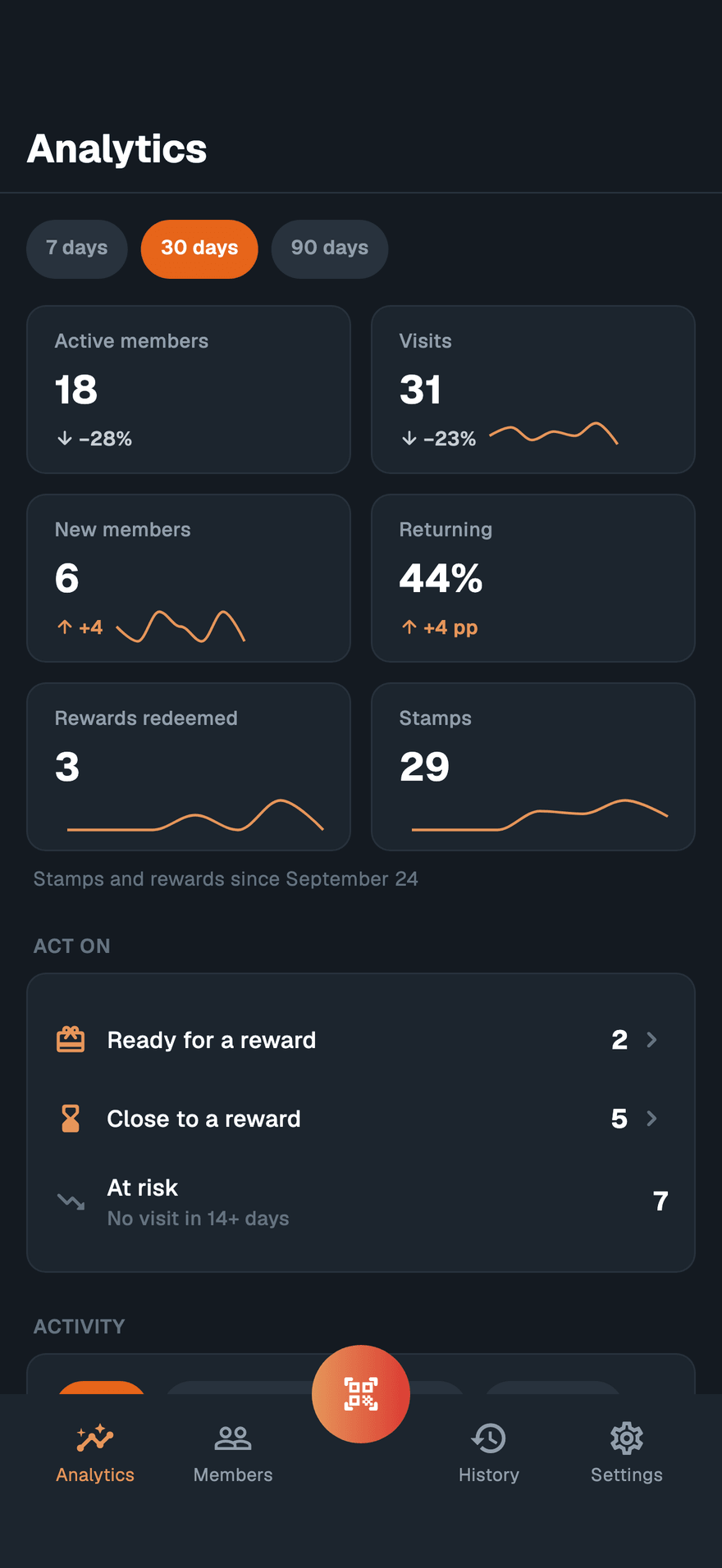
Tiles#
| Tile | Shows |
|---|---|
| Active members | Members with at least one visit in the range. |
| Visits | All visits in the range. |
| New members | Cards issued in the range. |
| Returning | Of the active members, the share with two or more visits in the range. Shows — until at least five members were active. |
| Rewards redeemed | Rewards handed out in the range. Stamp cards only. |
| Stamps | Stamps added in the range. Stamp cards only. |
| Points earned | Points added in the range, not counting balances set by hand. Points cards only. |
| Members | Valid cards of this template. Shown when it completes the last row of tiles. |
Stamps, rewards and points are counted from the day this history began to be recorded for your account. On a stamp card, when the range starts earlier, a line under the tiles says so, for example "Stamps and rewards since September 27".
Act on#
| Row | Members in it |
|---|---|
| Ready for a reward | A full card, or a reward level reached and not yet claimed. |
| Close to a reward | Not ready yet, with at least one stamp, and within the last fifth of the card — 8 or 9 stamps on the Coffee Card's 10. |
| At risk | The at-risk segment under Retention: no visit for longer than twice this programme's usual gap between visits. The caption gives the number, for example "No visit in 21+ days". |
Tap a row to open its members, up to 50, with the most frequent visitors first. Each shows their stamps or points and their last visit. Tap a member to open their details.
Activity#
A bar chart of Visits, New members, Stamps, Redeemed or Points — pick one above it. Bars are days for 7 and 30 days, and weeks starting on Monday for 90 days.
Peak times#
A grid of visits by weekday and hour, in your phone's time zone, with the busiest slot below it — for example "Busiest: Sat 10–11 h".
New members' journey#
For the members who joined in the range, how far each got:
| Step | Counts members who… |
|---|---|
| Joined | had a card issued in the range. |
| In wallet | added it to a wallet. |
| Came back | visited again on a later day than they joined. |
| Earned a reward | completed a card or reached a reward level. Stamp cards only. |
| Redeemed it | had a reward redeemed. Stamp cards only. |
Wallet#
| Figure | Shows |
|---|---|
| Apple Wallet | Members whose card is in Apple Wallet now. |
| Google Wallet | Members whose card is in Google Wallet, or any other wallet that is not Apple's, now. |
| Not added | Members whose card is in no wallet now. |
| Added | Times a card was added to a wallet in the range. |
| Removed | Times a card was removed from a wallet in the range. |
Rewards#
| Figure | Shows |
|---|---|
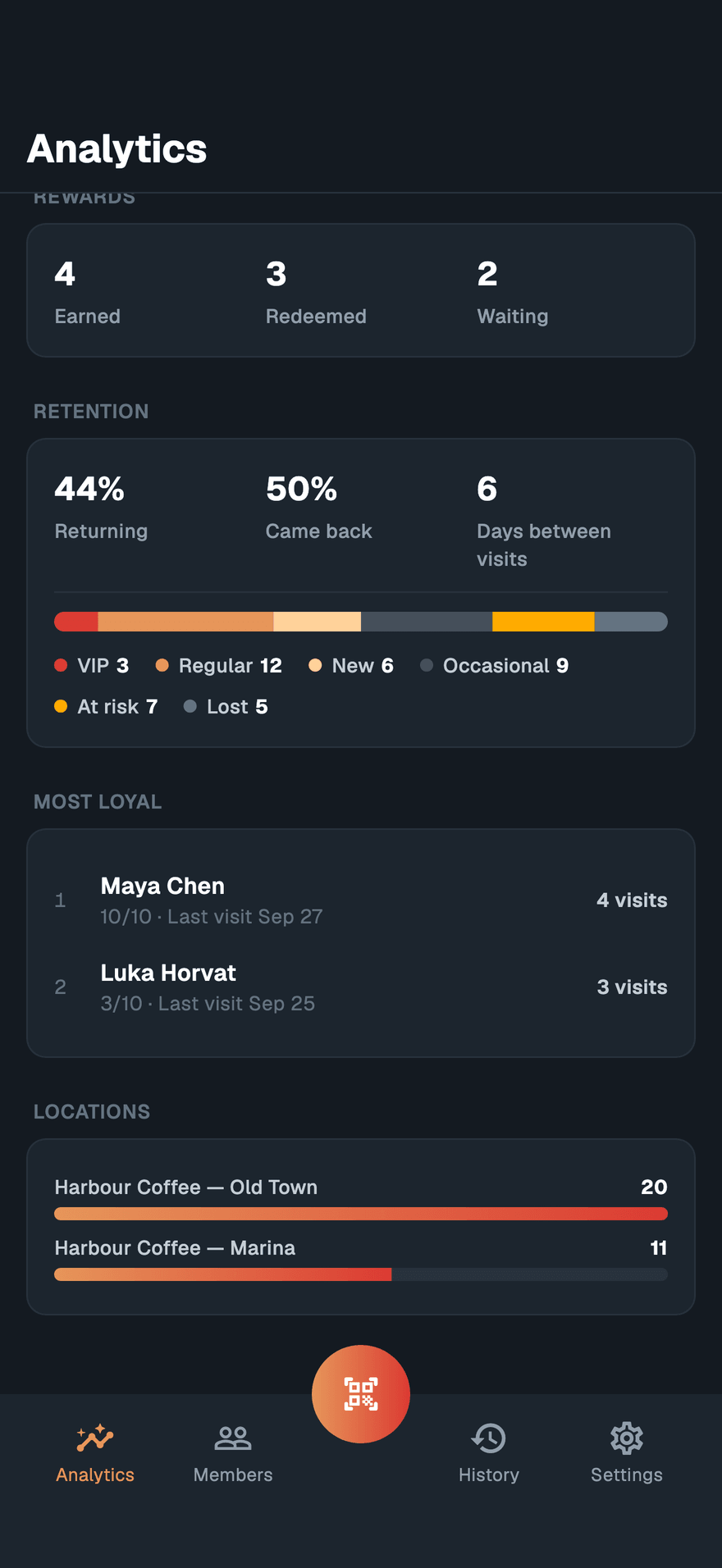
| Earned | Rewards earned in the range — a completed card or a reward level reached. |
| Redeemed | Rewards handed out in the range. |
| Waiting | Members ready for a reward now. |
| Points earned | Points added in the range. |
| Spent | Points spent in the range. |
| On cards | Points on all members' cards now. |
Retention#
| Figure | Shows |
|---|---|
| Returning | The same figure as the tile. |
| Came back | Of the members who joined in the range, the share who visited again on a later day. Shows — until at least five joined. |
| Days between visits | The typical gap, in days, between one visit and the next — the median over the last 90 days. |
Below them, every member falls into exactly one segment, worked out as of today from the last 90 days. A member is checked against the segments in this order and lands in the first one that fits:
| Segment | Member… |
|---|---|
| New | joined less than 30 days ago. |
| Lost | has not been seen for 90 days or more. |
| At risk | has not been seen for longer than twice the typical gap between visits, kept between 14 and 60 days. Without enough visits to measure, 30 days. |
| VIP | is in the top tenth by visits over 90 days, with at least 4 visits. |
| Regular | visited at least twice in the last 60 days. |
| Occasional | everyone else. |
"Seen" includes the day a member joined, so someone who joined 40 days ago and never came back is at risk rather than lost.
Most loyal#
The ten members with the most visits in the range, with their stamps or points, their last visit and their number of visits.
Locations#
Visits per location, when the template is used at more than one.
Limited roles#
Someone whose role covers only their own locations sees visits at those locations and the tiles built from them. Member totals, new members, Act on, the journey, the wallet split and the segments cover the whole template, so they are left out for them.
The member lists need permission to view members. Without it, the Act on rows show their counts but do not open, and Most loyal is left out. A listed member whose card carries no name is shown by the last four characters of the card's ID, for example "Card ••7F3A".