
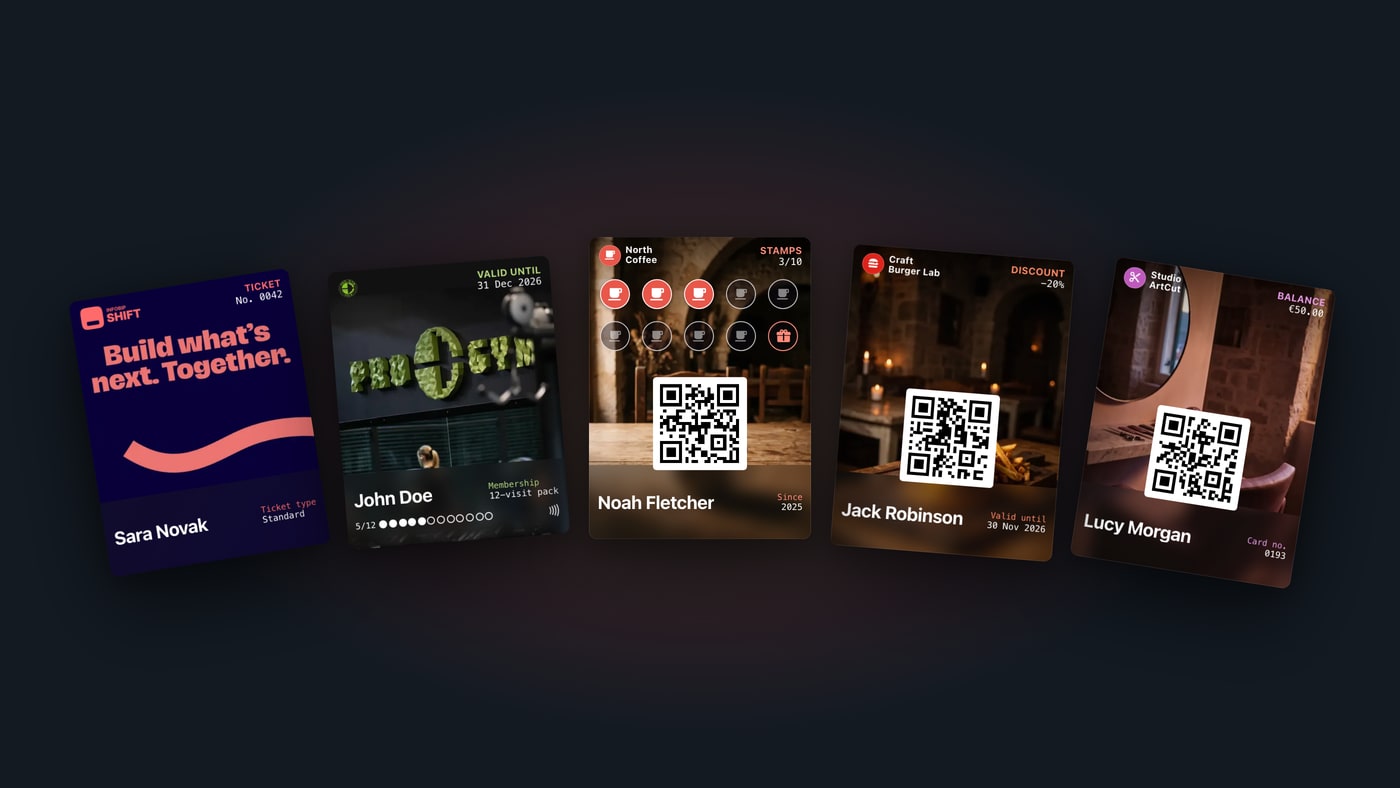
A wallet pass is a digital card that is saved to Apple Wallet or Google Wallet, the apps that are already on the phone. It can be a loyalty card, a membership card, a ticket, a coupon or a gift card. The customer installs nothing new: they add the pass with a tap, and at the checkout or the front desk they show it or hold it to a reader.
What is a wallet pass?
A wallet pass replaces a plastic or paper card. It is also called a digital pass, a mobile wallet card or simply a pass. It lives in the same app as bank cards and boarding passes: Apple Wallet on an iPhone, Google Wallet on an Android phone.
Each pass belongs to one person and carries their details: their name, their stamps or points, their balance or the date their membership ends. Unlike plastic, a wallet pass changes. When the customer earns a stamp or their membership is renewed, the change appears on the pass they already have.
In short:
- A wallet pass is saved to Apple Wallet or Google Wallet.
- The customer needs no app from the business.
- The pass is read by QR code or NFC, and it updates on its own.
Which types of wallet pass are there
Apple and Google each have their own layout for every type of pass, so a ticket looks like a ticket and a loyalty card looks like a loyalty card. These are the five basic types:
| Type | Example | What the pass shows |
|---|---|---|
| Loyalty card | Tenth coffee free, points in a shop | The customer's name and stamps or points |
| Membership card | Gym, club, association | The member's name, plan and expiry date |
| Ticket | Concert, match, conference | The event, date, venue and seat |
| Coupon | 20% off until the end of the month | The offer and its expiry date |
| Gift card | A €50 gift card | The remaining balance |
- Loyalty card
- Membership card
- Ticket
- Coupon
- Gift card







What a loyalty program with a wallet card looks like is on the Walletap Loyalty page. The digital membership card for gyms and clubs is on the Walletap Membership page (in Croatian).
A pass only has to be designed once. From the same template, Walletap builds a version for Apple Wallet and a version for Google Wallet. For everything that runs on Google's side, from pass types to Smart Tap, see Walletap for Google Wallet.
How a wallet pass gets onto the phone
The customer doesn't download any app. They get to the pass in one of these ways:
- They scan a QR code at the checkout, the front desk or on a poster, fill in a short form and get the pass straight away.
- They open a link they received by email or text message.
- They get it automatically, for example after paying for a membership online.
Every one of these routes leads to the pass page. It recognises the phone: on an iPhone it offers Apple Wallet, on an Android phone Google Wallet. The customer confirms, and the pass is in their wallet. If they open the link on a computer, the page shows a QR code to scan with their phone.
How a wallet pass is read: QR or NFC
Staff can read a wallet pass in two ways.
QR code. The pass carries a code that uniquely identifies the customer. Staff scan it with the camera of a phone or tablet, or with the scanner at the checkout. No new equipment is needed, so a QR pass can go live the same day.
NFC. The customer holds their phone to a reader, just like contactless payment. Apple calls this VAS (Value Added Services), Google calls it Smart Tap. The wallet sends the pass data to the reader encrypted, so a screenshot won't get through. This takes a reader that supports VAS and Smart Tap. A reader that accepts Apple Pay or Google Pay is not a wallet-pass reader for that reason alone. NFC passes in Apple Wallet also need Apple's approval.
A pass doesn't have to choose. An NFC pass can carry a QR code too, so it also works where there is no NFC reader. At a gym's front desk, a tap confirms the check-in and whether the membership is valid.
When a QR code is enough and when NFC pays off is covered in detail in our guide QR or NFC? How to choose the right technology for your wallet pass.
Updates and lock-screen messages
A wallet pass is not an image sent once. When something on it changes, such as a stamp, points, a balance or an expiry date, the new version reaches the phone, usually within seconds. The customer doesn't have to download anything again.
A change on the pass can also bring a notification on the lock screen:
- Apple Wallet shows a notification when a field on the pass changes, e.g. "You now have 8 of 10 stamps".
- Google Wallet shows a notification when the business adds a message to the pass. Google writes the notification text, at most three times per pass in 24 hours.
- Location. If you've added your shop addresses to the pass, Apple Wallet can suggest it on the lock screen when the customer is nearby, if they've allowed location access.
A pass with an expiry date, such as a coupon, moves to the expired passes once it runs out. How to send messages customers actually want, and what GDPR says about them, is in the guide Push notifications from Wallet.
How to launch wallet passes
- Choose the type of pass: loyalty, membership, ticket, coupon or gift card.
- Design it once: logo, colours and fields. The same design works for Apple Wallet and Google Wallet.
- Share it: a QR code at the checkout, a link by email or text message, or an import of your existing customer list.
- Read it: with a phone camera right away, and with an NFC reader where speed and copy protection matter.
Want to see what it looks like? Open walletap.com/demo on your phone and add a demo loyalty card to your wallet.
Frequently asked questions
Does the customer need an app for a wallet pass?
No. The pass is saved to Apple Wallet or Google Wallet, the apps that are already on the phone. The customer doesn’t download the business’s app or create an account.
Does the same wallet pass work on iPhone and Android?
Yes. The same pass is issued for Apple Wallet and for Google Wallet, and the pass page offers whichever wallet matches the customer’s phone.
Can a wallet pass be copied with a screenshot?
A QR code can, which is usually not a problem for a coffee stamp card. An NFC pass sends its data to the reader encrypted, so a screenshot won’t work on an NFC reader.
Can a wallet pass change after the customer saves it?
Yes. Stamps, points, the balance and the expiry date update on the pass the customer already has, usually within seconds, and a change can bring a notification on the lock screen.
What if the customer changes or loses their phone?
On the new phone, they open the link to their pass again and add it to their wallet; if they no longer have the link, the business sends it again. Stamps, points and the membership stay, because it is the same pass.
Want to launch your own wallet pass? Get in touch and we'll help you choose the type of pass and the first step.