
The reality: customers don't want another app
Your loyalty program isn't failing because of bad rewards. It's failing because it asks customers for a step they don't want to take: download, install and sign up for yet another app.
Picture the moment at the till. The server asks, "Do you have our app?" The customer shakes their head, there's a queue behind them, and the chance is gone. Not because they aren't interested in the program, but because the way in is too long.
The good news is that there's a shorter way. A card saved to Apple Wallet or Google Wallet with a single tap, with no App Store, no passwords and no waiting.
Why loyalty apps rarely succeed
Most installed apps are forgotten within a month. According to a Business of Apps review across 31 app categories, an average of 25.3% of users come back the day after installing, and only 5.7% remain on day 30. The same source reports that the average app loses 77% of its daily active users in the first three days.
For a loyalty program, that means three problems:
- Friction at the door. Download, sign-up, password, permissions. Every step loses some customers, and it all happens at the till, in front of a queue.
- The fight for space. On a customer's screen, your app competes with social media, their bank and their messages. A café or a salon rarely wins there.
- Cost. Development, maintenance for iOS and Android, updates after every new version of the operating system. For a small or mid-sized business, that investment is hard to earn back when only a few percent of users are active.
What a wallet pass is and how it works
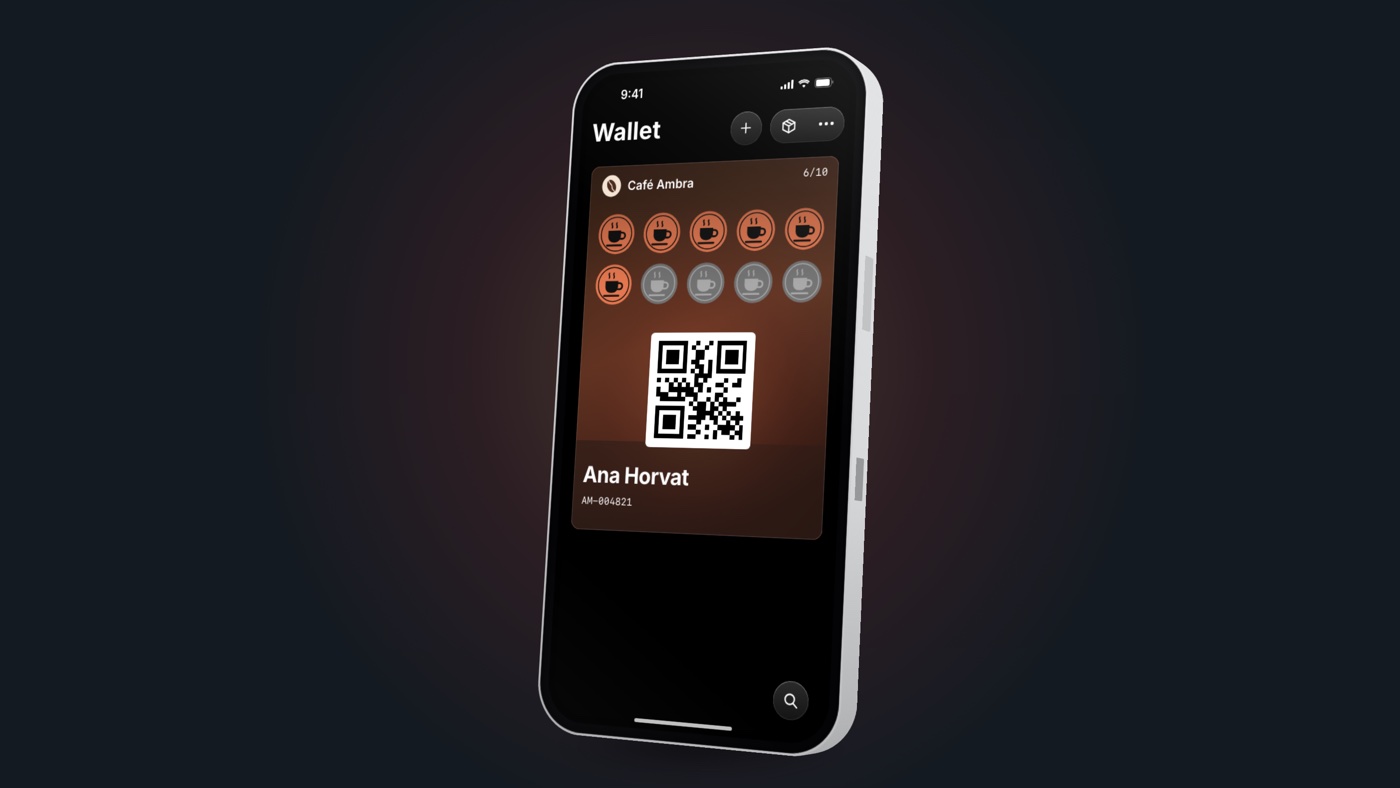
A wallet pass is a digital card that lives in an app the customer already has: Apple Wallet on an iPhone or Google Wallet on Android. There's nothing to download and no new password.
The customer's journey looks like this:
- The customer scans a QR code on the counter or the receipt, or opens a link from an email or a message.
- They enter a few basic details (name, email or phone number) on a short web page.
- They tap "Add to Apple Wallet" or "Add to Google Wallet". The card is saved.
- On their next visit, they show the card at the till. Staff scan it, and the stamp or points update on the card straight away.
The whole process takes less than a minute. The card looks like your brand, with your logo, colors and points balance, and you can change it remotely at any time.
What you get as a merchant
A wallet card removes the biggest obstacle, which is joining the program. More customers in the program means more return visits.
| Loyalty app | Wallet card | |
|---|---|---|
| Onboarding a customer | Download, sign-up, password | A QR code and one tap |
| Time at the till | Several minutes | Under a minute |
| Where the card lives | One of dozens of apps | In the Wallet, next to their payment cards |
| Notifications | Depend on in-app permissions | A card update with a lock-screen notification |
| Development and upkeep | Two apps (iOS and Android) | One platform for both systems |
| Changing design or offer | A new app release | Instantly, remotely |
Three benefits merchants usually notice first:
- The card doesn't get forgotten. Customers always have it with them, on the phone they take out to pay anyway.
- A direct line to your customers. When you change a points balance or add an offer, the customer sees it on the card, with a notification. No text messages to send and no spam filter.
- Data about your guests. You can see who comes back, how often, and which rewards work. A paper card will never tell you that.
When an app does make sense
An app isn't a bad idea; it's just rarely a good place to start. It makes sense if you offer customers something they use every day: ordering, bookings, workout tracking or online shopping.
Even then, a wallet card helps. A customer who doesn't want to install the app can still be in the program, and one who has it gets a card in their Wallet as a faster way to identify themselves at the till. The wallet isn't a replacement for your app; it's the front door for everyone who will never download it.
How to get started in five steps
You can launch a digital loyalty program without developers and without new equipment at the till.
- Choose the mechanic. Stamps (e.g. buy 9 coffees, get the 10th free), points for spend, or membership tiers. For cafés and salons, stamps are the simplest start.
- Pick a reward that pays off. Valuable enough to motivate, and close enough that the customer reaches it in the first month or two.
- Design the card. Logo, colors and a clear message on the front. Put the terms and your contact details on the back.
- Put the QR code where customers wait. On the counter, the receipt, the tables, the shop window and in your email signature. Give your staff one sentence to offer the card with.
- Track and adjust. After a month, look at how many customers have joined and how many came back, and change the reward or the message if you need to.
The bottom line
The best loyalty program is one customers join without thinking about it. A wallet card makes that possible: one tap, no app, and the card is always in their pocket.
Walletap helps businesses launch loyalty cards, membership cards and tickets in Apple Wallet and Google Wallet. Pro-Gym, the largest gym chain in Istria, Croatia, uses it for the membership cards at its five locations.
Want to see what your card could look like? Get in touch for a free demo, and we'll prepare a card design proposal with your logo.